

 English


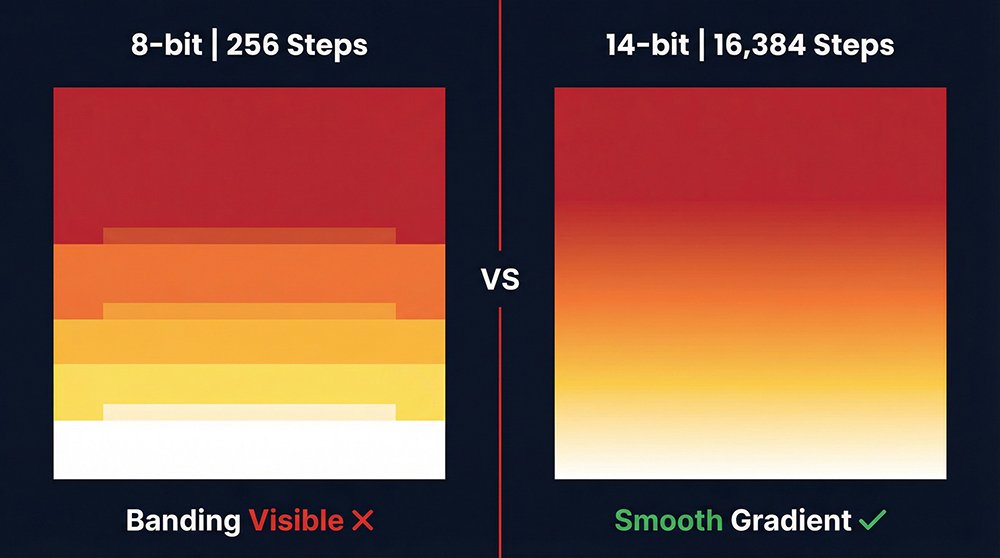
LED display grayscale defines the number of brightness steps between pure black and pure white — 8-bit delivers 256 steps, while 14-bit delivers 16,384. That 64× difference separates a display that shows visible color blocks in a sunset gradient from one that renders broadcast-accurate skin tones and shadow detail.
This guide covers the bit-depth formula and a full 8-bit to 16-bit comparison table. It explains the critical difference between driver bit depth and input bit depth, a scene-by-scene selection guide, and a 3-step on-site verification method — everything needed before issuing a purchase order.
What Is Grayscale in an LED Display?
Grayscale is the single image-quality parameter that separates a mediocre LED display from a broadcast-grade one. It defines the number of distinct brightness steps the screen can render between absolute black and peak white.
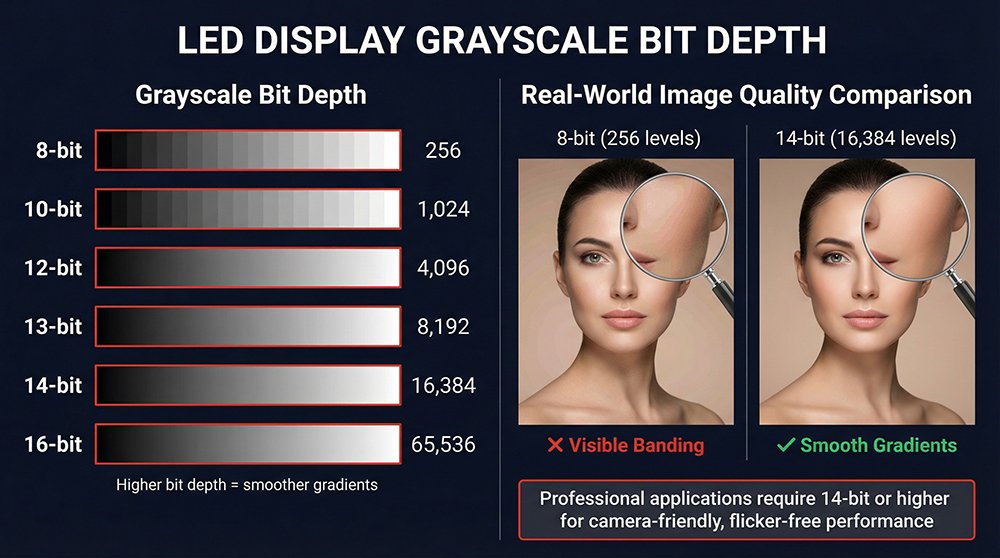
Think of a sunset. The sky transitions from deep red through orange, yellow, and into white. Rendering that transition requires hundreds of intermediate brightness steps per color channel. An 8-bit display allocates 256 steps to cover the full range; a 14-bit display allocates 16,384.
Where the 8-bit panel produces visible color blocks — a hard jump from one shade to the next — the 14-bit panel renders every subtle shift continuously, matching what a camera captures in real life.
One distinction most suppliers skip entirely:
In technical documentation, LED display color depth and grayscale bit depth are used interchangeably — both refer to the same driver IC specification.
| Parameter | Defines | One-Line Rule |
|---|---|---|
| Brightness | Overall output level (nit / cd/m²) | Determines whether the screen is visible |
| Grayscale | Transition smoothness between levels | Determines whether the screen is accurate |
A 1,200 nit panel with 8-bit grayscale produces a vivid but banded image. The same panel with 14-bit grayscale produces a vivid and detailed image. For B2B procurement: never evaluate brightness without checking the bit depth that delivers it.
Bit Depth Formula & Full Comparison
Every LED display datasheet lists a grayscale value — but few explain what that number actually means for image quality on site.
Every grayscale spec follows one formula: Grayscale Levels = 2ⁿ, where n is the bit depth.
8-bit = 2⁸ = 256 steps10-bit = 2¹⁰ = 1,024 steps12-bit = 2¹² = 4,096 steps14-bit = 2¹⁴ = 16,384 steps16-bit = 2¹⁶ = 65,536 steps
Each additional bit doubles the available range. Moving from 8-bit to 10-bit quadruples the steps (256 → 1,024). Moving from 10-bit to 14-bit multiplies them by 16.
The perceptual jump from 8-bit to 10-bit is dramatic — visible banding disappears in gradients. The jump from 12-bit to 14-bit is subtler, but becomes critical the moment a broadcast camera enters the room.
Quick Bit Depth Comparison
| Dimension | 8-bit | 10-bit | 12-bit | 14-bit | 16-bit |
|---|---|---|---|---|---|
| Grayscale Levels | 256 ★ | 1,024 ★★ | 4,096 ★★★ | 16,384 ★★★★ | 65,536 ★★★★★ |
| Total Colors | 16.7M | 1.07B | 68.7B | 4.39T | Ultra |
| Gradient Smoothness | Banding visible ✗ | Smooth ✓ | Fine detail ✓ | Broadcast-grade ✓ | Cinema HDR ✓ |
| Shadow Detail | Poor ✗ | Basic ✓ | Clear ✓ | Precise ✓ | Exact ✓ |
| Camera-Safe | ✗ | ⚠️ Limited | ✓ Most cases | ✓ All cameras | ✓ Mandatory VP |
| Drive Method | Basic PWM | PWM | PWM | Hybrid PWM+PAM | Hybrid PWM+PAM |
| Relative Cost | $ | $$ | $$$ | ||
| Best Use Case | Text signage only | General commercial | Premium retail / museum | Broadcast / events | Virtual production / XR |
What low grayscale actually looks like on screen:
| Test Scene | 8-bit (256 levels) | 14-bit (16,384 levels) |
|---|---|---|
| Sunset / sky gradient | Hard color blocks, harsh transitions | Every shade visible, natural progression |
| Dark scene / shadows | "Dead black," no texture | Hair strands, fabric depth visible |
| Live broadcast / skin tones | Stepping artifacts, unnatural bands | Accurate gradation, broadcast-ready |
| Dark logo on black background | Logo disappears into background | Clear separation, full detail retained |
The banding phenomenon is most visible in the 10–30% brightness range — where most dark scene content lives. Always focus grayscale verification on this range first, not full-brightness content where all bit depths look comparable.
Driver vs. Input Bit Depth: What Dealers Hide
The most misrepresented grayscale specification in the LED display industry is driver bit depth vs. input bit depth. Confusing the two is the most common reason a rated 14-bit display still shows banding on site.
Input bit depth is the resolution of the video source feeding the screen — most broadcast content, presentation software, and video files operate at 8-bit.
Driver bit depth is the internal processing precision of the LED driver IC — the chip that translates a signal value into a physical brightness level at each pixel.
Here is why driver bit depth matters even with an 8-bit source:
8-bit input → 8-bit driver:256 input steps → 256 output steps → gaps visible → banding8-bit input → 14-bit driver:256 input steps → mapped across 16,384 output steps→ fills the gaps between steps → smooth output → no banding
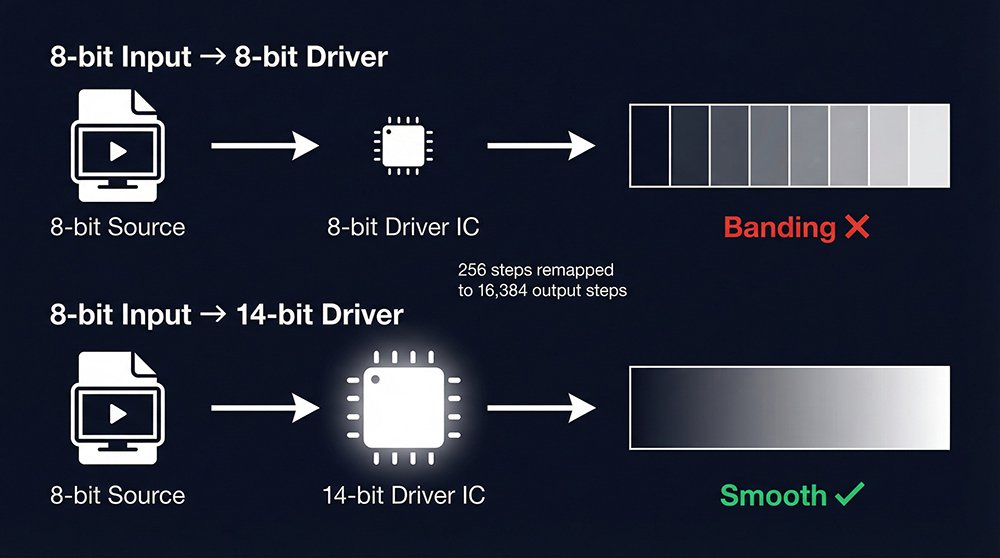
A 14-bit driver IC does not require a 14-bit source to deliver its advantage. It remaps the incoming signal across its full output range, redistributing the 256 input values across 16,384 physical brightness steps — producing a visibly smoother image from the same source file.
Three questions to ask any supplier before confirming the grayscale spec:
Question 1: "What is the driver IC model number?" — Request the datasheet. The IC spec lists native bit depth and supported drive methods. Question 2: "Is the bit depth native IC output or software extension?" — Software-extended "virtual grayscale" performs significantly worse than hardware-native output at low brightness levels. Question 3: "Does the driver IC support hybrid PWM+PAM?" — Pure PWM-only ICs lose shadow detail at low brightness. Hybrid PWM+PAM maintains precision across the full brightness range.
| Drive Method | Principle | Shadow Detail | Recommended For |
|---|---|---|---|
| Current control only | Varies LED current | Poor ✗ | Low-end signage |
| PWM only | Switches LED on/off | Moderate ✓ | General commercial |
| Hybrid PWM + PAM | Combines both | Excellent ✓✓ | Broadcast, virtual production, events |
Which Bit Depth Does Your Application Need?
Matching bit depth to application is the fastest way to future-proof an LED display investment. The right grayscale level depends entirely on what content plays on screen and whether a camera is pointing at it.
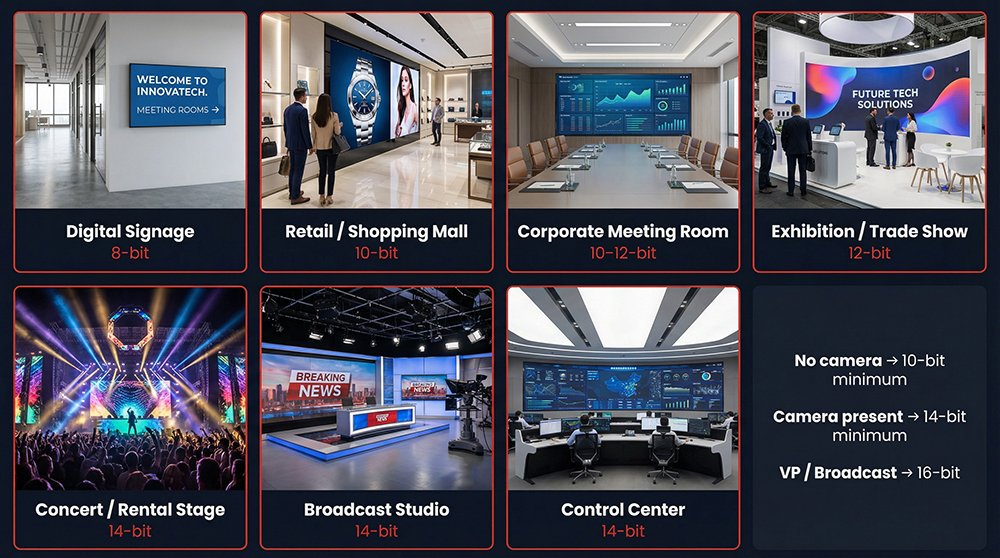
The most reliable procurement rule: if a camera is present at any point during the display's operating life, specify 14-bit minimum. Camera sensors expose banding that the human eye tolerates. A gradient that looks smooth to a live audience produces visible steps at 1/1000s shutter speed.
Broadcast cameras, press photographers, and smartphone slow-motion all reveal low grayscale artifacts that no post-processing corrects. Field data from rental event deployments shows that over 80% of banding complaints trace back to screens running below 12-bit driver output — not defective hardware, but under-specced grayscale.
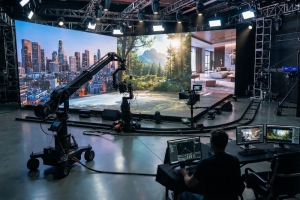
For virtual production and XR stage applications, 16-bit is not optional — it is the industry baseline set by ICVFX workflow requirements. A touring rental company that specified 10-bit inventory for standard events and later accepted a broadcast-recorded concert booking will face on-camera banding that cannot be corrected in post. The safest single-SKU decision for rental inventory is 14-bit: it covers corporate conferences, live events, and broadcast recording without re-speccing per booking.
Application-by-application selection guide:
| Application | Min. Bit Depth | Drive Method | Key Reason |
|---|---|---|---|
| Digital signage / text only | 8-bit | Basic PWM | No gradients, text-only content |
| General retail / shopping mall | 10-bit | PWM | Product color, cost balance |
| Corporate meeting rooms | 10–12-bit | PWM | Presentation gradients, skin tones |
| Premium brand / flagship store | 12-bit | PWM | Brand color precision, dark scenes |
| Museum / cultural exhibition | 12–14-bit | Hybrid | Artwork fidelity, shadow detail |
| Concert stage / rental events | 14-bit | Hybrid PWM+PAM | Camera-facing, broadcast recording |
| Broadcast studio / TV set | 14-bit | Hybrid PWM+PAM | Skin tone accuracy, HDR compliance |
| Virtual production / XR stage | 16-bit | Hybrid PWM+PAM | ICVFX on-camera, industry mandatory |
Quick selection rule (copy directly into your RFP):
No camera on site → 10-bit minimumCamera present at events → 14-bit minimumCamera IS the output (broadcast / VP) → 16-bitBudget-constrained commercial → 10-bit is the safe floor
How to Verify Grayscale Before Signing Off
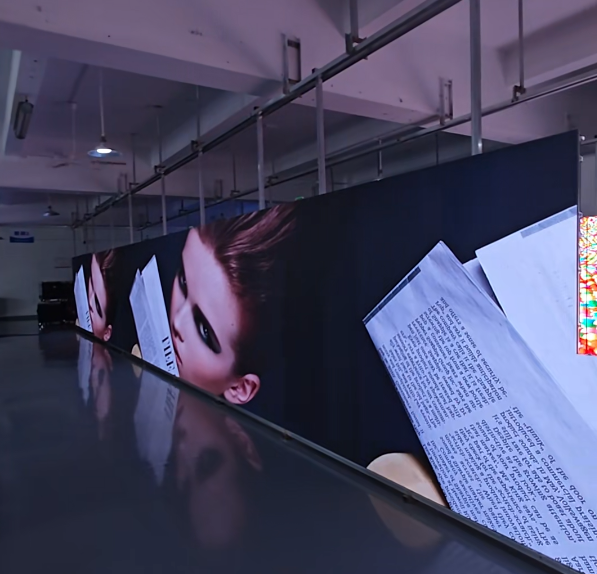
A datasheet alone cannot confirm grayscale performance — the only reliable verification is a physical test on delivered hardware before signing the acceptance document.
Three tests require no specialist equipment and complete in under 10 minutes on site:
Test 1 — Grayscale Gradient Test Pattern
-l Load a full-screen 0–100% grayscale gradient image (freely available from calibration tool libraries) -l View at rated brightness from the specified minimum viewing distance -l Focus on the 10–30% brightness range — human vision is most sensitive to banding here, and this zone exposes driver IC limitations that full-brightness testing never reveals -l Any visible step or block in the gradient = driver bit depth below specification
Test 2 — Smartphone Slow-Motion Check (240fps)
-l Record 5 seconds of full-white screen at rated brightness @ 240fps -l Play back at 0.25× speed -l Horizontal scan lines = refresh rate cannot sustain claimed bit depth output -l Clean image = refresh rate and grayscale perform within specification
Test 3 — Control System Software Verification
-l Open XVisual NovaLCT or Colorlight CableStar on the processor -l Navigate to display configuration → locate "Bit Depth" or "Grayscale" output setting -l Confirm configured bit depth matches the hardware IC specification -l Request the supplier perform this step while you observe — screenshot the setting for your acceptance record -l For virtual production volumes, request the bit depth verification report in writing as part of the formal delivery package
Acceptance checklist for grayscale sign-off:
□ Gradient test: no visible banding in 10–30% brightness range□ Slow-motion test: no horizontal scan lines at 240fps□ Controller bit depth confirmed in software — matches IC datasheet□ Supplier provides IC model number and datasheet in writing□ Low-brightness content (dark logo, dark scene) reviewed on site
Frequently Asked Questions
Q: What is LED display grayscale and why does it matter?
LED display grayscale is the number of brightness steps rendered between pure black and peak white. An 8-bit display produces 256 steps; a 14-bit display produces 16,384 — the higher the count, the smoother gradients, shadow detail, and skin tone accuracy appear in real content.
Q: How do I calculate LED display grayscale levels?
Apply the formula Grayscale Levels = 2ⁿ, where n equals the bit depth. 8-bit = 256 levels, 10-bit = 1,024 levels, 14-bit = 16,384 levels. Each additional bit doubles the available steps — the jump from 8-bit to 10-bit alone quadruples grayscale resolution.
Q: What is the difference between driver bit depth and input bit depth?
Input bit depth is your video source resolution — most content is 8-bit. Driver bit depth is the LED IC's internal processing precision. A 14-bit driver remaps 256 input steps across 16,384 output steps, eliminating banding even from standard 8-bit source material.
Q: Which grayscale level do I need for virtual production?
Virtual production and XR stage applications require 16-bit grayscale minimum, paired with a hybrid PWM+PAM driver IC. On-camera LED volumes must eliminate all banding at broadcast shutter speeds — 14-bit covers most live events, but ICVFX workflows demand 16-bit.
Q: Why does my LED display show banding despite a 14-bit spec?
Banding on a rated 14-bit display typically means the driver IC operates below its rated bit depth, or the control system is configured at a lower output setting. Request the IC model datasheet and verify the bit depth setting in XVisual NovaLCT or Colorlight CableStar — the configured value must match the IC's native specification.
Q: How do I test LED display grayscale on site?
Display a full-screen grayscale gradient test pattern and inspect the 10–30% brightness range for visible steps. Record 5 seconds at 240fps on any smartphone and play back at 0.25× speed — a clean image with no horizontal banding confirms both refresh rate and grayscale performance are within specification.
Not sure which grayscale spec fits your project? Send us your application type and viewing environment — we will return a bit depth recommendation with a matched product suggestion within 24 hours. [Request a Spec Review →]
LED Display Grayscale: Quick-Select Guide
□ Text / signage only → 8-bit□ General commercial → 10-bit□ Premium retail / museum → 12-bit□ Broadcast / events → 14-bit□ Virtual production / XR → 16-bit
Key rule: always confirm DRIVER bit depth — not input bit depth.
On-site test: gradient pattern (10–30% range) + 240fps smartphone check.
Supplier must provide driver IC model and datasheet before acceptance.