



 English


For LED displays, nits (cd/m²) is the only brightness metric that tells you how readable your screen will actually be. Lumens measure total light output from a source, not what your eye sees on a display surface. This is a critical distinction in LED display brightness specification. A screen rated at 800 nits becomes effectively invisible when ambient light climbs above 10,000 lux. Specifying the wrong metric is exactly how expensive projects end up with screens that fail acceptance tests. Below, we break down the core differences, when each unit applies, what the conversion formula really requires, and a copy-ready RFP checklist.

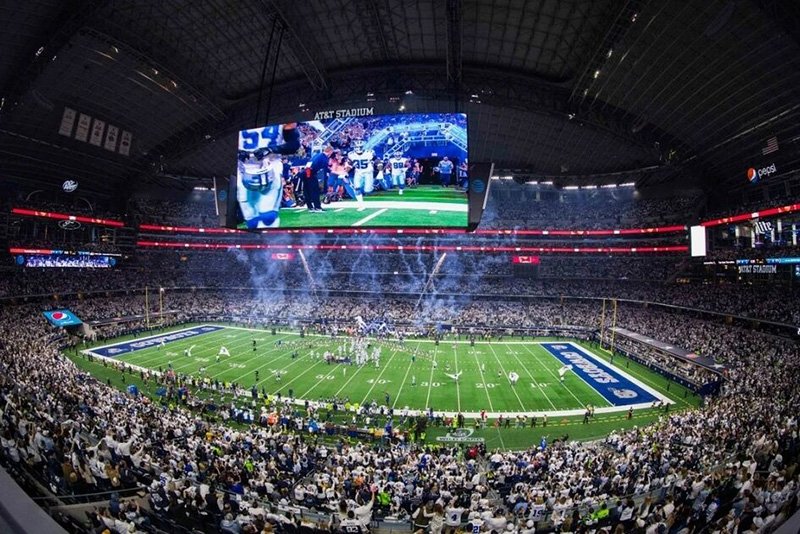
Quick Answer: Nits vs Lumens at a Glance
| Dimension | Nits (cd/m²) | Lumens (lm) | Lux (lx) |
|---|---|---|---|
| What it measures | Surface luminance — how bright the screen looks | Total light output from a source | Incident light falling on a surface |
| Right device for it | LED walls, LCD, OLED ★★★ | Projectors, lamps ★★★ | Site ambient light survey ★★★ |
| Direct conversion? | ✗ Needs screen area + geometry | ✗ Needs screen area + gain | ✓ lux = lumens ÷ m² |
| Typical range | 800–10,000 nits | 2,000–30,000 lm | 300–100,000 lux |
| Procurement use | RFP spec + acceptance criteria ✓ | Projector selection ✓ | Ambient light audit ✓ |
| Best use case | Any LED display spec | Projection system spec | Indoor/outdoor readability check |
Simple rule: Buying an LED display? Use nits. Buying a projector? Use ANSI lumens. Auditing a site? Measure lux first.
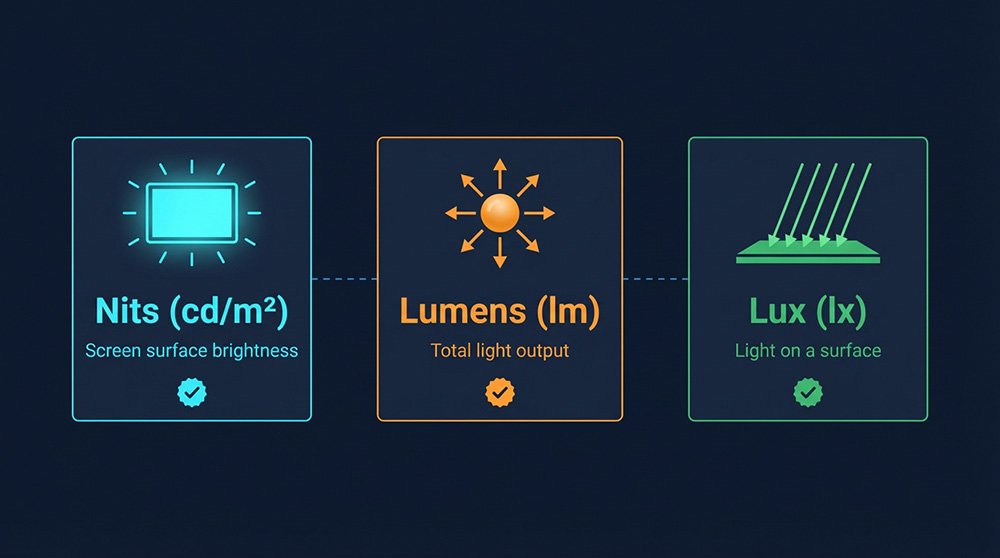
1. Three Brightness Units Explained
A lot of the confusion between nits and lumens comes from mixing up what each unit is actually counting. Before you compare them, get all three core units straight.
Nits (cd/m²) — the LED Display Unit
A nit is a unit of luminance: how much light a surface emits per square meter, in one specific direction. Technically, 1 nit = 1 cd/m² (one candela per square meter). The two terms are completely interchangeable in display specs.
In plain terms, nits answer the question “how bright does this screen look to the person standing in front of it?” — and that’s the number that matters for LED display selection.
Remember this key point: Nits are a surface density measurement. Screen size doesn’t change them. A 10 m² P2.5 LED wall and a 5 m² P2.5 LED wall both rated at 1,500 nits look equally bright. The luminance value per square meter stays constant regardless of total screen area.
Lumens (lm) — the Light Source Total Output Unit
Lumens measure luminous flux: the total amount of visible light a source emits in all directions. Think of it as a bucket count — how much light comes out of a lamp, projector, or fixture overall.
The critical thing lumens don’t tell you is how bright any particular surface will appear. Take two 1,000-lumen bulbs — a narrow-beam spotlight and a wide diffuse bulb. The spotlight looks far brighter because it concentrates light into a smaller cone. Same lumens, very different perceived brightness. That’s why lumens work well for projectors and lamps but fall apart when used to spec a display.
Candela (cd) — the Bridge Between the Two
Candela is luminous intensity in a specific direction, and it’s the unit that connects lumens and nits. The relationships are:
1 cd = 1 lm/sr (lumen per steradian — steradian is the unit of solid angle) 1 nit = 1 cd/m² Therefore: 1 nit = 1 lm/(sr·m²)
In LED display manufacturing, individual LED chips are spec’d in millicandela (mcd). A typical outdoor module shows R: 500–800 mcd, G: 1,800–2,500 mcd, B: 400–700 mcd per chip. These per-chip intensities directly feed into the panel’s final cd/m² rating.
LED lighting fixtures, by contrast, use lumens because the goal is room illumination, not display — higher lumens mean better room coverage.
Target Nits by Environment — Quick Reference
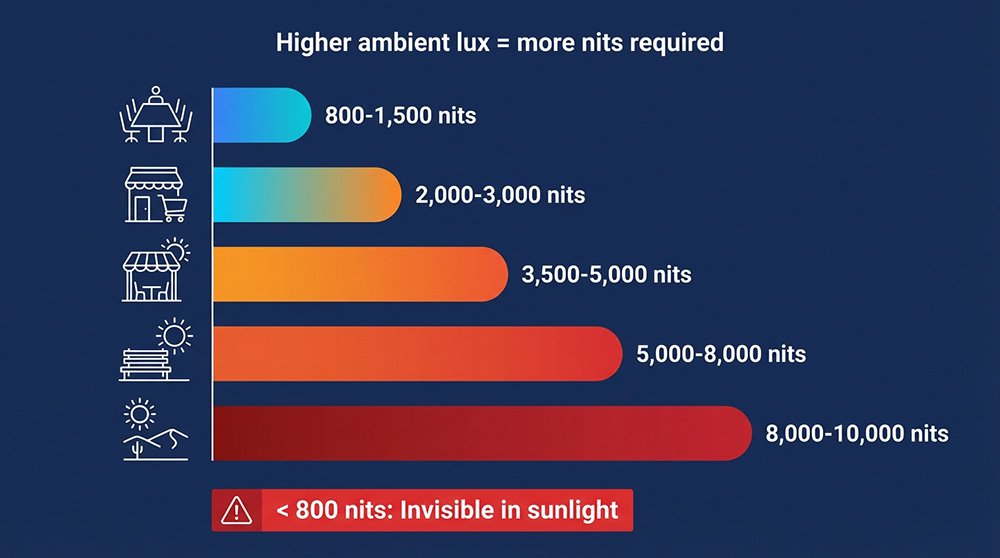
| Environment | Ambient Lux | Minimum Nits Required |
|---|---|---|
| Office / conference room | 300–500 lux | 800–1,500 nits |
| Retail / showroom | 1,000–2,000 lux | 2,000–3,500 nits |
| Semi-outdoor (shaded canopy, transit shelter) | 5,000–15,000 lux | 3,500–6,000 nits |
| Direct sunlight / open outdoor | 50,000–100,000 lux | 6,000–10,000 nits |
| Middle East outdoor (desert / extreme solar) | 80,000–120,000 lux | 8,000–10,000 nits |
2. Nits for Displays, Lumens for Projectors
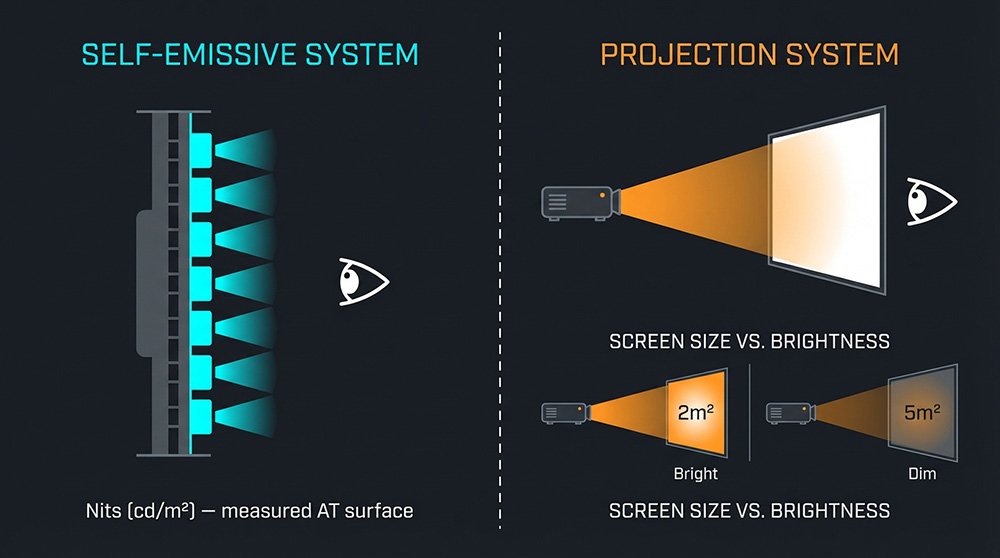
Both LEDs and projectors produce light — why do they use completely different units? The answer comes down to how each technology produces light and what measurement is actually useful for procurement.
LED displays are self-emissive. Every pixel is its own light source, forming a uniform emitting plane. You’re looking directly at the light-producing surface, so what matters is brightness density per unit area — which is exactly what nits measure. The larger the LED wall, the more total light it puts out, but the cd/m² value stays the same because the emitting area scales proportionally.
Projectors are source-to-surface systems. A projector is a point source that throws light onto a reflective screen. You’re looking at reflected light off a surface whose size you control. Lumens tell you how much total light the projector generates. This is useful because viewer experience depends on how you spread that light: double the screen size, halve the brightness. A high-gain screen (1.3–1.5 gain) can meaningfully boost perceived brightness from the same lumen output.
The cleanest way to remember it: nits = what you see looking at the screen; lumens = how much light the source is generating.
3. Lumens-to-Nits Conversion Explained
Most guides give you “1 nit = π (≈ 3.14) lm/m²” as if it’s a universal constant you can always apply. It isn’t.
That equation assumes a 1 m² perfectly diffuse Lambertian emitting surface, measured perpendicularly, with no reflective losses. Real LED panels and projection setups break at least one of those assumptions. Using the formula without stating those conditions produces numbers that look like specs but can’t be measured or verified on site.
Conversion: What’s Valid and What Isn’t
| You have | You can compute | Reliable? | When to use it |
|---|---|---|---|
| Projector lumens + screen area (m²) | Lux on screen = lumens ÷ m² | ✓ Yes | Projector installation planning |
| Screen lux + gain factor | Approximate nits | ✓ Estimate only | Projector cross-check |
| LED wall rated nits (cd/m²) | Already the right unit | ✓ Use directly | All LED display specs |
| Lumens figure only, no area given | Nothing actionable | ✗ Avoid | Don’t use this in LED RFPs |
Two examples that make this concrete:
Projector example: A 5,000-lumen projector onto a 2 m² screen delivers 2,500 lux on the surface. Move to a 5 m² screen — same projector, same room — and you’re down to 1,000 lux. That’s a 60% brightness drop from simply changing screen size. Same lumens; dramatically different viewer experience. LED wall example: Two panels both rated at 5,000 nits can look noticeably different in the same room. Differences in surface reflective coating change effective contrast. Color calibration drift after 1,000 operating hours can shift perceived brightness by up to 15%. A single cd/m² number doesn’t capture any of that.
The takeaway: Never accept a single-number nits claim without the test pattern, measurement method, and sustained operating duration. And never accept a lumens-to-nits conversion without a stated screen area and surface gain factor.
4. Brightness Mistakes That Fail Acceptance Tests
Mistake 1: Higher Nits is Always Better
Running an indoor screen at unnecessarily high nits accelerates LED chip degradation. Sustained high current means more heat, and heat shortens chip lifespan. It also drives up power consumption and, in close-viewing environments, causes eye fatigue. Match the brightness level to the environment.
Mistake 2: Ignoring LED Chip Luminous Intensity (mcd)
The nits value on a datasheet is the result of: chip mcd rating × pixel density × driver performance. A panel with weak per-chip mcd values that compensates with higher drive current may technically hit its cd/m² spec in a lab test. In real conditions, it shows uneven brightness and color shift — especially in the corners. Always ask for the chip mcd spec alongside the panel nits rating.
Mistake 3: Confusing Peak Nits with Sustained Nits
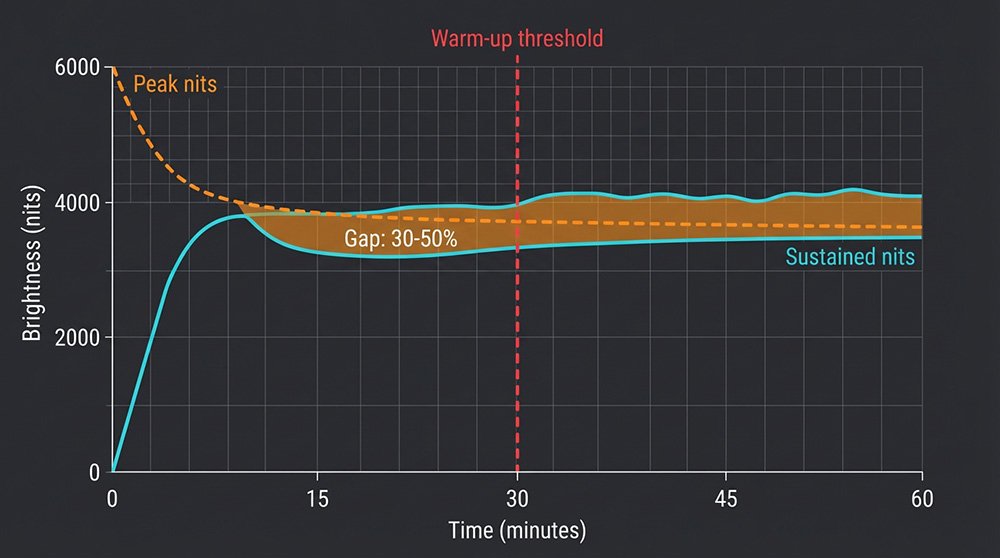
Peak brightness is what a panel can hit for a brief burst, often under a 10% white window pattern for a few seconds. Sustained brightness is what it maintains during continuous full-white operation for 30–60 minutes.
The gap between these two figures can be 30–50%. A panel advertised at 6,000 nits peak may sustain only 3,000–4,200 nits in real operating conditions. Always ask for both numbers in writing.
These three LED display brightness mistakes are the most common reasons panels fail acceptance tests on delivery day — and every one is preventable with the right spec language upfront.
5. LED Nits Spec: Procurement Workflow
The correct procurement sequence is: measure ambient lux first → choose technology → write verifiable acceptance criteria. Picking a display before auditing the environment is the fastest way to a failed acceptance test.
LED Wall vs Projector — Decision by Use Case
| Use case | Choose LED wall (nits) when | Choose projector (lumens) when |
|---|---|---|
| Corporate boardroom | Always-on use + any ambient light | Room reliably darkened + budget priority |
| Retail storefront / window | Daylight readability non-negotiable ✓ | Not recommended |
| Museum / exhibition | Close viewing + color accuracy critical | Large format + lightweight install required |
| Event stage / concert | IP-rated outdoor durability needed | Temporary install + long throw distance |
| Outdoor billboard / facade | Direct sunlight exposure → 6,000+ nits ✓ | Not applicable |
| 24/7 control room | Continuous operation + high contrast | Not recommended |
RFP Acceptance Checklist — Copy This Into Your Tender Document
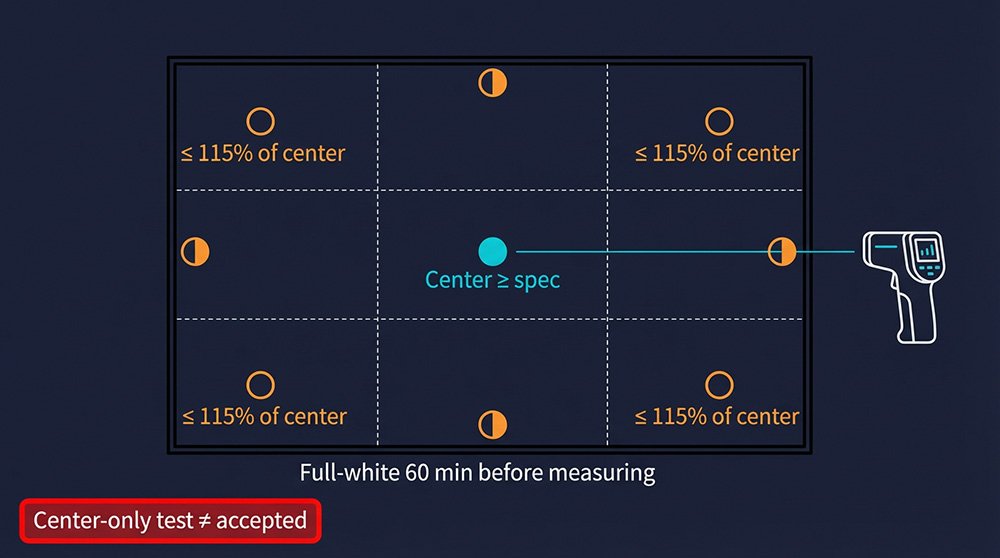
Sustained brightness: Measured luminance ≥ [INSERT MINIMUM NITS VALUE] cd/m² after 60 minutes of continuous full-white operation at rated input power. Peak nits to be declared separately. Test pattern: Full-white (100% white field). Supplier must declare 10% window peak value if it exceeds the full-white figure by more than 20%. Measurement grid: 9-point average (center + 4 midpoints + 4 corners). Center value ≥ stated spec; corner-to-center variance ≤ 15%. Environmental log: Ambient lux recorded at screen surface and primary viewer position at time of test. Date, time, weather, and window/door state all documented. Calibration status: All measurements taken post-calibration. Calibration file version and date archived with delivery documentation. Thermal condition: 30-minute warm-up minimum before measurement. Ambient temperature at time of test recorded.
For outdoor LED billboard nits requirements, apply the same checklist. Replace the minimum luminance threshold with the environment-specific figure from the Section 1 table, and add IP rating and solar irradiance conditions to the environmental log.
Regional Notes for International Projects
Middle East: Ambient temperatures of 40–50°C and solar irradiance above 1,000 W/m² — spec 20% above the environmental minimum, use die-cast aluminum heatsinks, anti-reflective coating, and IP65+ weatherproofing. Northern Europe: Operating down to -30°C with humidity above 80% — specify freeze-resistant module design, IP66+ rating, and COB encapsulation for indoor fine-pitch applications. Compliance: EU exports require CE + RoHS; US/Canada commercial installs require ETL or UL; outdoor permanent installs in Northern Europe require IP66 (not IP65) as a minimum.
FAQ
Q: How do you convert lumens to nits? You can’t do it directly for LED displays — LED walls are self-emissive and rated directly in nits (cd/m²). For projectors, a working estimate is: nits ≈ (lumens ÷ screen area in m²) × screen gain ÷ π. Always state the screen area and gain factor alongside the result.
Q: How many nits do I need for an outdoor LED display? Open outdoor screens in direct sunlight need at minimum 6,000 nits; Middle East and high-irradiance environments should be spec’d at 8,000–10,000 nits. Measure ambient lux at your exact install location first — a heavily shaded outdoor site at 5,000–15,000 lux may be fine with 3,500–6,000 nits.
Q: What’s the difference between peak nits and sustained nits? Peak nits is a brief burst figure, often measured under a 10% white window pattern for seconds. Sustained nits is what the panel maintains during continuous full-white operation for 30–60 minutes — and the gap between them can be 30–50%. Always require sustained nits in your specification, and ask for both figures in writing.
Q: Which metric should I use in an LED video wall RFP? Always use nits (cd/m²). Including lumens in an LED display RFP creates ambiguity that suppliers can exploit during acceptance — it’s the wrong unit for a self-emissive surface and has no agreed conversion method without additional geometric parameters.
Q: Why do two “5,000-nit” LED displays sometimes look different? The nits figure alone doesn’t capture surface reflectance, color calibration state, contrast ratio, or measurement methodology (center-only vs 9-point average). Using the RFP acceptance checklist above — with defined test patterns, measurement grids, and sustained vs peak declarations — is the only reliable way to eliminate this ambiguity before sign-off.
Q: How do I verify LED screen brightness on site at acceptance?
Measure ambient lux at the screen surface and primary viewer position with a calibrated lux meter. Run the screen at full-white for 60 minutes. Record the nits value across your agreed 9-point grid using a spot luminance meter or calibrated camera profile.
Log both numbers together — ambient lux and screen nits — because readability depends on the ratio between them, not the screen figure alone.